Resolve conflicts in place
Local, editable result and incoming side by side with full-file context. Arrows accept a change, × dismisses it, and you can still type in the result. Undo covers both text and decisions.
 Branchlight
0.6 early access · macOS
A focused desktop client with a clear commit graph, useful diffs and careful three-way conflict resolution. It runs the official Git you already have, so what you see is what Git does.
Free for 14 days · macOS 12+ on Apple Silicon · Windows coming later
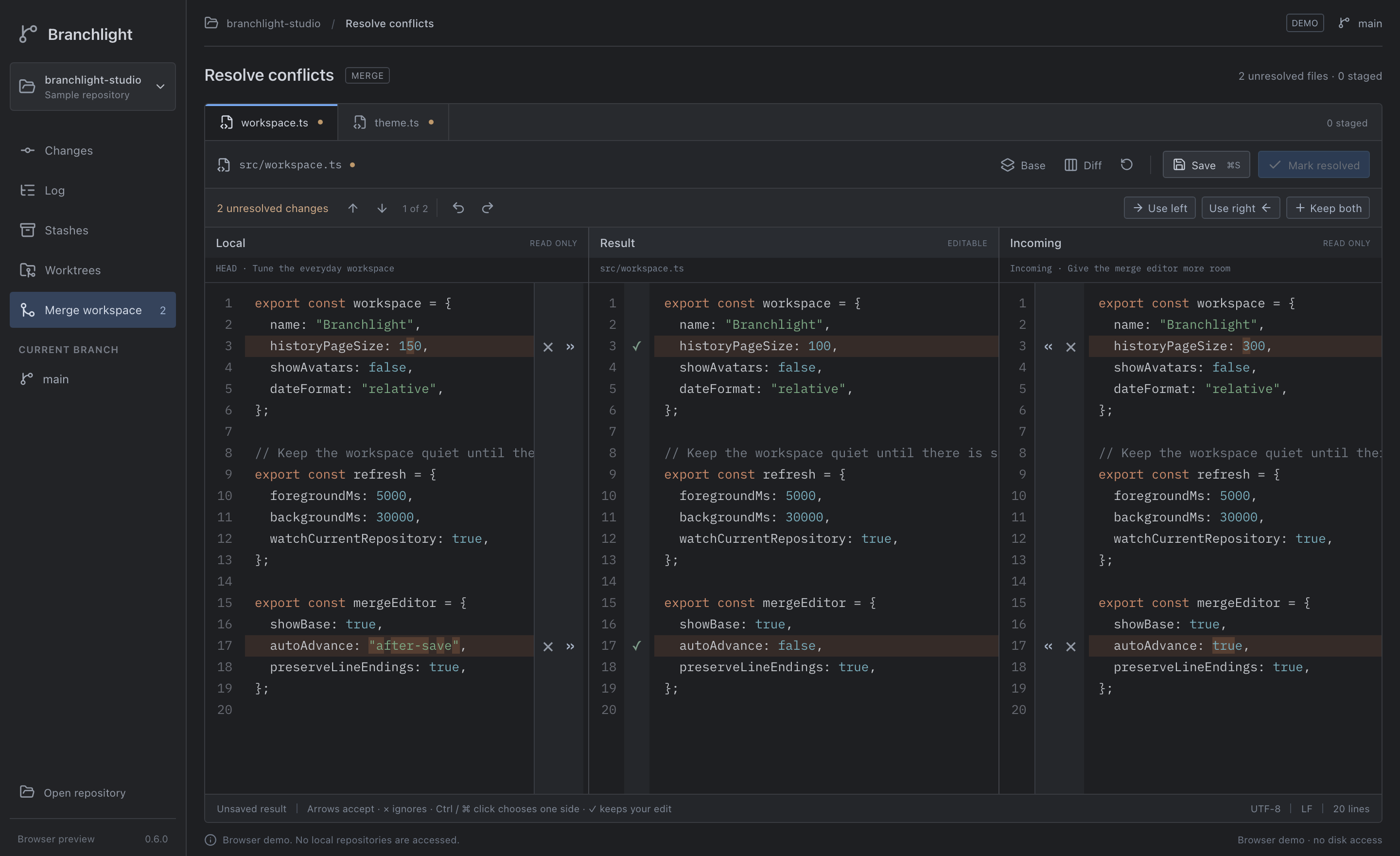
Local, editable result and incoming side by side with full-file context. Arrows accept a change, × dismisses it, and you can still type in the result. Undo covers both text and decisions.
Stage, unstage or discard per hunk or per line, built on Git's own diff and
git apply. Discards are backed up first and can be restored.
A compact lane graph with virtual scrolling, filters by message, branch, author, path and date across the whole repository, and the everyday commit actions one right-click away.
Saving a merge result and marking it resolved are separate steps. External edits are detected before anything is written, and force-push is always lease-protected.
Fetch, pull, push with progress and cancel; branches, stashes, worktrees, rebase, cherry-pick, file history and annotate.
A restrained dark workspace that leaves room for code. Signed and notarized by Apple, and it updates itself from inside the app.
Early access
US$29.99 one-time
Tax included. Your activation code arrives by email right after payment.
No. Everything works for 14 days. Afterwards opening repositories needs an activation code; your files and repositories are never touched.
Yes. Branchlight runs the official Git on your Mac, for example the one from the Xcode Command Line Tools or Homebrew.
Choose “Deactivate this computer” in the old one, then activate the new one with the same code. If the old Mac is gone, reply to your purchase email.
It is in progress. A code you buy now will work on Windows too, one computer at a time.